Showing posts with label Scrivener. Show all posts

Saturday, 5 October 2013

Experiments in Scrivener - Part Aaargh!

     When I signed off last week, I was inclining towards buying Scrivener.
     I'm glad I experimented a little more before I did, because it's all gone horribly wrong.
     One of the attractions of Scrivener, you see, was that, once you've finished your book, you can 'compile' it and produce it in any one of several formats - PDF, e-bookpub, mobi.
     Since I publish e-books, I thought the mobi format (which is what Amazon's Kindle uses) would be useful. And as I would like to publish paper books with Amazon's CreateSpace, the PDF format would be useful too.
     I had promised to send Anushree Prashant, of Ink Pantry
Publishing, a couple of my books, in PDF form, to review. I'd already sent her Ghost Drum - I produced the PDF from my files, using Word, in a couple of minutes.
     I thought I'd send her Nightcomers as the second one, and use Scrivener to produce the PDF, so I could test-drive the 'compile'  tool.
The Ghost Drum by Susan Price
     Four days later, I was still trying to produce that PDF. This, despite looking up many 'How To' tutorials on-line, by people who all raved about Scrivener, and how it was easy and 'intuitive' and 'free from care' (as Oliver Hardy used to say, immediately before everything went horribly wrong and the bricks fell on his head.)
     Maybe I am overlooking something very obvious. I allow that possibility. On the other hand, I'm not thick, and I'm usually pretty quick to pick such things up.
     I did produce PDFs - but none of them were as good, or as easy, or as quick as the one I produced with Word, by simply choosing 'Save as PDF' from the Word menu.
       It's claimed that, in Scrivener, you have 'complete control' over the formatting of your book when you 'Compile' it. Well, so you do in Word, too.  I found trying to get Scrivener to do as I wanted was maddeningly complicated, long-winded and difficult. And sometimes impossible.
     For instance, Nightcomers is a collection of short stories. I didn't
Nightcomers by Susan Price
want each story to begin 'Chapter One, Chapter Two,' and so on. I wanted them to begin with the title of the story, and that alone.

     Scrivener insisted that they begin with chapter headings. There is a template for 'a short story' but it's meant to produce a single short story, for submission to an editor. That is Scrivener's main purpose - to produce a manuscript for submission.
      '"Compile" gives you complete control of your manuscript,' claimed all the how-to blogs and demos. I tried and tried to get rid of the chapter headings. I followed instructions, venturing deeper and deeper into the programme's bells and whistles, menu lists and tick-boxes. Sometimes I was hopeful - but that bloody chapter heading kept coming back, no matter what I did.
      'Compile' also brings up a series of levels - Level 1, Level 1+, Level 2, Level Three.
     Intuitive? Is it hell as like. I tried and tried to understand what was going on with these levels. Some seem to control titles alone, others text alone - sometimes you get blank, titled pages, sometimes not. Some are chapter folders, some are scenes, some are both... Fonts go astray, Bold comes and goes...
     I read manuals and blogs, I watched videos. I tried my usual method of clicking buttons and observing what happens. None of it got me anywhere.
     So, am I still going to buy Scrivener?
     No - because I've reached the end of the time I'm prepared to spend fighting with it.
     I'm sure I could learn how to use it, eventually - but would it be worth the time, effort and hair-loss?
     I don't think so.
     I like the planning part of it. It is good to have everything there on one screen - research, writing, corkboard, images.
     But once you've done all that planning, you have to get it out of Scrivener, and that's a bloody nightmare. You could just copy and paste back into Word - but the programme is supposed to save you the trouble. And if you'd split your book up into lots of separate scenes, as Scrivener suggests, it would be an awful faff. A head-nipping fankle, in fact.

     For a long time now I've been doing something very Scrivener-ish in Word, without going to any extra expense. And without my head being as severely nipped as it's been over the past few days.
     Here, for instance, is a shot of a section of my Research File for Sterkarm 3.


     To the left you can see the 'Navigation Pane', which is also known as 'Document Map' in some versions of Word. You find it in Word's 'View' menu. Click on the box and the pane to the left appears.


     I made the heading 'Poisonous Plants' a 'Heading 1' by highlighting the words and then clicking 'Heading 1' (found in the 'Home' menu.) 'Poisonous Plants' then appears in the left hand Navigation pane.


     I wanted to have notes on several poisonous plants: Monkshood, Foxglove, Henbane - and then another section on poisonous mushrooms.
     So I pasted in my notes, and then made the headings -
Monkshood, Foxglove, Henbane - into 'Headings 2'. They then appear in the Navigation pane, but inset, like this:

Poisonous Plants
     Monkshood
     Foxglove
     Henbane
     
     I can then make 'Poisonous Mushrooms' another Heading 1, so the whole looks like this - 


Poisonous Plants
     Monkshood
     Foxglove
     Henbane
Poisonous Mushrooms

     Or, I could make the flowers Headings 3, and Mushrooms Heading 2 - in which case, it would look like this:-

Poisonous Plants
          Monkshood
          Foxglove
          Henbane
     Poisonous Mushrooms

      Now the important point here is that, if I want to look up what research I have on poisonous plants, I don't have to scroll through the whole research document.
     I just look down the Navigation Pane on the left. (I can scroll up and down it independently of the central, editing pane; and it's much shorter.) When I see these headings, I can click on 'Poisonous Plants' - and the cursor in the central Edit Pane jumps straight to that heading. (It's a hyperlink, like those in ebooks, but Word's Navigation Pane makes it very easy and quick to insert one.)
     Or, I can click on any of the other Navigation headings - no matter what size they are - and I will be taken straight to that point in the file. I have notes - and Navigation Pane Headings - on medieval kitchens, still rooms, modern radio communications, sting grenades... and on and on.
     As you can see, from the above, you can have images in these files. You save the image to desktop, and use 'insert picture' to add it to your Word file.
     When I'm writing, and want to check something in my research file, I open another window, and open the research file in that, which means clicking from one to the other. But I could have both files visible on the same screen, with a split screen. If you go to the 'View' menu in Word, it offers you a choice of 'Open New Window' - which means you can open a new window from inside the file you're working on. (Circled in green.)


     Or you can 'Split', which splits the screen horizontally. You can have different parts of the same file showing above and below the split, or you can open another file in one half of the split. (Scrivener gives you the option of splitting the screen vertically as well, if you think that would be useful.)
     You could have all your writing and all your research in one gigantic Word file, and skip around it by using the Navigation Pane. (I imagine that, at some point, the file would become too big for Word to cope with, but text files can be massive before they cause modern computers problems.)
     Personally, I find opening two windows, one for my writing and one for my research, is quite easy and quick. I don't like the split screen much, and prefer to open a new window.
     So, as far as I can see, the only thing you get with Scrivener that you can't do with Word, is the corkboard toy. Which is a pretty good toy, I admit.
     I enjoyed playing with it, and think I would find having my plans in front of me, and easily visable, very useful - but not useful enough to cough up £30 for that alone.
     I think I might take a pointer from Scrivener, though, and set up 'Character' files in my research folders in future, with images and notes. I'll do the same for 'Locations'. Though I did do something similar for my Drovers' Dogs story, where the boy follows a drovers' route from the Fintry Hills to Mull.

     This only shows you part of the file. I could follow the route through the hills and lochs. My own memories, plus these visual cues, were a very effective shove to my imagination.   

      Scrivener does allow you 30 days of trial USE, not simply 30 calendar days, which is generous. I might hang on to it for the days I have left, until I see what my A-E colleague, Chris Longmuir has to say about Scrivener in November, on the A-E How-To Day.
     She loves the programme and, who knows, she may yet persuade me.
     But I think, after all, I'll be sticking with Word.

Saturday, 28 September 2013

Experiments in Scrivener

     I first heard of the Scrivener programme when I was working
for the RLF. Another writer told me about it. The programme was, he said, the greatest example of writerly procrastination ever. Its creator, Keith Blount, allegedly, came up with it to help him organise his material for his 'big novel' - which still hasn't been written.
     Later I heard about it from Authors Electric's Chris Longmuir, who is a big fan - and will be writing about it for a forthcoming Authors Electric 'How To Day' on the 29th day of  some future month.
ChrisLongmuir
     My impression, after reading what Chris had to say, was: 'Well, I can do all of that in Word.' If I want all my research for a book in one place, I can make a Research File, and give it sub-headings with Word's 'Document Map' or 'Navigation Pane.' If I want visual references, I can insert them into the files. Another Author Electric, Catherine Czerkawska, was sceptical too. One of the features Chris mentioned was being able to write scenes out of sequence, store them in a separate file, and then, later, slot them in where they seem to fit best. 'I never write out of sequence,' Catherine said, 'so I don't think I'd find this useful.' We're not easy sells, me and Catherine.
Catherine Czerkawska

     But I'm between books at the moment - always a restless time. Sterkarm 3 is still with my new agent. I've finished the book about the boy walking across the Highlands with herd-dogs, and am letting it rest for a while. (A child at a school recently suggested I call it 'Those Two Dogs.')
     So I've dug out a couple of projects that fell by the wayside a while ago. One is partly written, but has no middle or end (but a lot of promise, I think.) The other is a pretty wild and woolly, futuristic, SF-flavoured idea which is still in the first sketchy stages of planning. (I abandoned it, not because of lack of enthusiasm, but because Life got in the way about a year ago. Oh, and the Scottish dogs came bounding into view.)
     I've been casting round for a way to plan out these books, so I can see clearly what I've got and where they might head. I wanted to use something like the Beat Sheet ideas set out by Roz Morris in 'Nail Your Novel' and also in 'Save The Cat!' by Blake Snyder.
Roz Morris
     Trouble is, these methods require lots of fiddly index cards, or big sheets of paper, and space to spread them out - space I don't really have. Was there some tighter - almost, you might say, virtual - way of doing it? And I remembered that Scrivener offers a free 30 day trial.
     So I went here, and downloaded it.
     First of all I read through the substantial - two hours! - introductory course that comes with it. It made my head spin, and I felt a bit overwhelmed - but I have to say it is very thorough. And interactive, so you actually get to try the tools out as it takes you through them. Okay, it takes two hours, but you do finish up with a very good idea of what Scrivener can do - and, I suppose, if you hate it, you can cut your losses right there, uninstall it, and never think about it again.
     I liked what I saw, so I decided to go ahead and load my work into it, and see how I got on. And after a night's sleep, I found it much less overwhelming, and quite easy to use.
     I've been working with Scrivener for a couple of days now, and I think I may be a convert. Scrivener costs $40, by the way, which works out at about £30 - which, considering everything it does, is pretty good value.
     So here's what Scrivener looks like on my screen.


     To the left is the pane which holds the 'Binder' for this particular project. Think of it as a giant folder to hold all the other folders.
     The staggered entries you can see down this panel are my entered chapters and scenes.

     At the bottom of this pane are folders for storing Research, Characters and Places - all accessible by simply moving your cursor to the left.
     And you can split the screen, either horizontally or vertically, so you can have your work on one side of the split, and a reference file, maybe a visual reference, on the other. (You can do this in Windows, but it's much easier in Scrivener.)
     To the right is another pane, which holds the 'index cards' which will show up on the 'corkboard'. Here you can enter a brief summary of each chapter or scene: who's in it, what happens, where it takes place, etc. At the bottom of this right-hand pane is a section where 'key-words' can be entered. These will help you find a particular spot or - if a key-word is a character's name, for instance - find every chapter and scene in which they appear and 'compile' them, so you can read through only those scenes, and check how they are working.
     In the centre is the edit box where you write - or copy in what you've already written. You can work through in order, from beginning to end, or you can write scenes here and there as they occur to you and fit them together later. Scrivener is designed to work with you, whatever your style.
     And say, for instance, that you wanted to take an overview of just those scenes featuring your talking dog. Use key-words to find them and 'compile' them in the Edit box - it's as if someone had sorted through your paper manuscript, found just those scenes and put them in front of you.
     Suppose, as you read through them, you make the odd change here and there - put in a better phrase, correct some typos, etc. At the end of your reading, these separate scenes return to their proper place in the 'manuscript' - but all the changes you made are retained. It's as if you took those pages out of a paper manuscript, checked through them, altered them, and put them back in their proper order. Only a lot easier to do.
     Right at the centre of the Edit screen, at the top, are three buttons. They are Pages, Corkboard and Outline.


     Pages, as you'd expect, shows you the pages you're working on, and you navigate through the different chapters and scenes by clicking on the headings in the pane to the left. This is also where any compilation you choose to make is read.
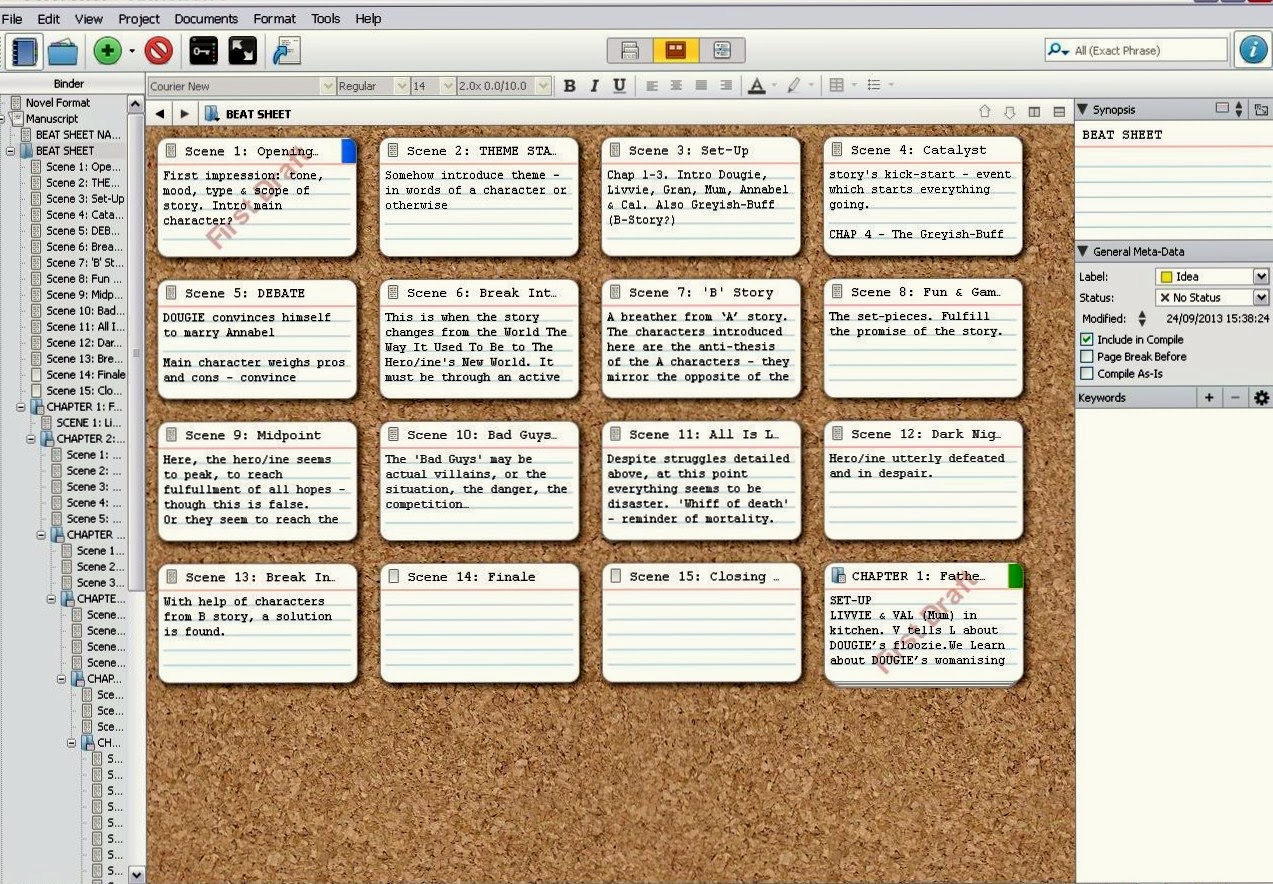
     But sometimes you get befuddled by all those words. You want to see the story simply laid out in front of you. At those times you click on Corkboard, and this shows you your 'index cards' notes from the right-hand pane - but shows you them all together. Like this. (You can change the size of the cards, and how many appear in a row.)


     I made my first 'chapter' a list of beats instead, to help me plot my story - each 'scene' or 'index card' is a beat in the story. Tiny pictures can be imported into the top left corner of the card, and differently coloured 'pins' can be added to the right hand corner (say, a different colour per character.) You can move them around, to see if your story can be improved.
     But I think I may find the third button as useful, if not more so. This shows you an outline. Like this:


      It's the index cards simplified, and gives you another way of keeping track of who's doing what to whom, and when.
     I haven't even talked about the research, character and place files, or what Scrivener will do for you when you've finished your book.
     I think this blog may run to two or three episodes...
     And I have a month to decide whether or not to cough up thirty quid to buy the programme. Scrivener promises that I'll be able to unload all my writing from the programme, without harming it, if I decide not to buy.
     But, at the moment, I am inclining towards buying...Or getting someone else to buy it me as a very early Christmas present.